ข้ามไปยังเนื้อหาหลัก

31 บทความ ที่ติดแท็ก "tutorial"

ดูแท็กทั้งหมด

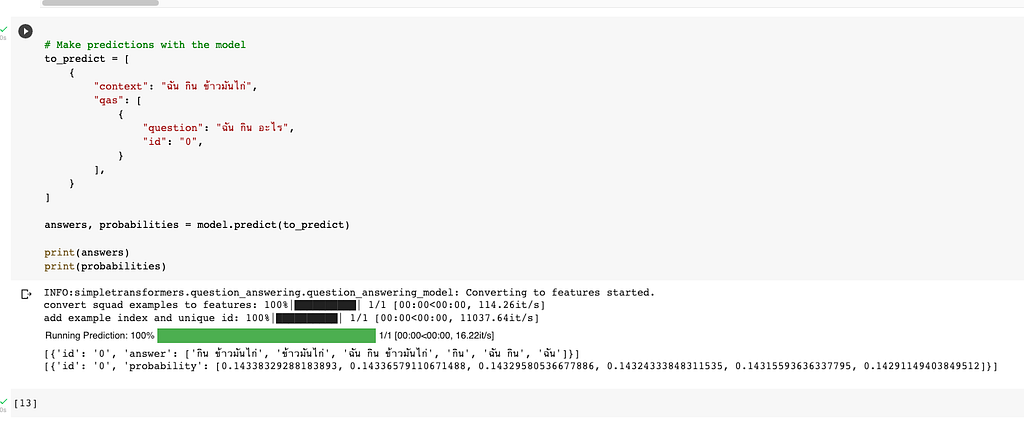
แจกวิธี Train Thai Question Answering AI ใช้ Wangchanberta บน Dataset iApp QA โดย Simple Transformer

· อ่าน 2 นาที
Kobkrit Viriyayudhakorn
CEO, iApp Technology

แจกวิธี Train Thai Question Answering AI ใช้ Wangchanberta บน Dataset iApp QA โดย Simple Transformer

How to make Thai QA System using SimpleTransformer

Colab:

https://colab.research.google.com/drive/1inDOJzCh-iG3_aAU-73tq3FzlCwM8nvY#scrollTo=vLChKnukd3gC


แจกวิธี Train Thai Question Answering AI ใช้ Wangchanberta บน Dataset iApp QA โดย Simple… was originally published in Kobkrit on Medium, where people are continuing the conversation by highlighting and responding to this story.

How to directly download files from Dropbox, or Google drive using wget in Terminal or in Google Colaboratory.

· อ่าน 3 นาที
Kobkrit Viriyayudhakorn
CEO, iApp Technology

How to directly download files from Dropbox, or Google drive using wget in Terminal or in Google Colaboratory.

Google Colaboratory is a great tool for data science and machine learning practitioners nowsday. Since a Google Colaboratory is a GPU-enable remote compute instance running on Google Cloud. It does not locally run on our machine. It is quite difficult to upload the dataset or any CSV files into the remote instance.

The easiest way to do is, we upload our files to the Public folder in the Dropbox. We copy the public link and download it using command as follow.

# Dropbox

# Dropbox


## Google Colaboratory


!wget -O news.csv <https://www.dropbox.com/s/XXXXXXX/news.csv?dl=0>


## Terminal, Command Line


$ wget -O news.csv <https://www.dropbox.com/s/XXXXXXX/news.csv?dl=0>

# Google Drive

Unfortunately, in Google drive is not easy like in the Dropbox, the Google drive does not provide direct public link that allow us to fetch the file directly. When you turn on the Link Sharing, They usually provide us the virtual path like this.

[https://drive.google.com/open?id=XXXXXXXXXXXXX](<https://drive.google.com/open?id=1opkctEFmJ8E08PRzaiqNrEyUZcbXegsJ>)XXXXXXXXXXX

Since our team using Google drive as the primary source of file sharing, we need to think the solution for it.

Luckily there is a tool called Gdown (https://github.com/circulosmeos/gdown.pl). You can install via pip. It can directly download file from the Google drive virtual path for us, we can use in the command as follows.

# Google Drive


## Google Colabratory


!gdown --id XXXXXXXXXXXXXXXXX


## Terminal, Command Line


$ pip install gdown


$ gdown --id XXXXXXXXXXXXXXXXX

Note that you need to extract the “XXXXXXXXXXXX” part from the virtual link provided from Google drive by yourself.

Does this blog article helpful?? If yes, please help us press a Clap hand button and press a purple Follow button for getting helpful tips on Artificial Intelligence, Data Science, Machine Learning and Computer Science from iApp Technologyand kobkrit.com

For those whoever want to develop and get consult on creating your own AI model, please getting more information at our company website “iApp Technology” (https://iapp.co.th) and testing our AI demoes (https://ai.iapp.co.th). You can contact me directly at kobkrit@iapp.co.th. Thank you very much. #iApp #Ai

See more at https://iapp.co.th and https://ai.iapp.co.th


How to directly download files from Dropbox, or Google drive using wget in Terminal or in Google… was originally published in Kobkrit on Medium, where people are continuing the conversation by highlighting and responding to this story.

Trick: How to significantly reduce NPM download time for NodeJS Web application on Docker image

· อ่าน 2 นาที
Kobkrit Viriyayudhakorn
CEO, iApp Technology

2

Docker made my life much easier! I put every web application project to its own docker container. Docker allows me to deploy web application server on any cloud or any service providers. We can customize the dependencies to any versions of libraries that we want to use, and also integrated well with any continuous integration tools (like Jenkins).

Docker is excellent, but, the biggest drawback of Docker compared to the traditional FTP upload to server, it requires significant amount of time to complies a docker image. Generally for moderate size of web application project, it takes about 6–8 minutes to produce an image.

Turn out, I found the way to optimize the time to produce an image, especially for NodeJS Web application. Most of docker image compile time is wasted due to NPM install. It contributes 95% of the time. With simple Dockerfile modification, I can reduce from 6 minute to 10 seconds for building an image if the dependencies is not changed.

Instead of writing Dockerfile in the popular format like this.

FROM node:9  
MAINTAINER Kobkrit Viriyayudhakorn (kobkrit@iapp.co.th)RUN mkdir -p /usr/src/app
WORKDIR /usr/src/app
COPY . /usr/src/app/
RUN npm installCMD [ "npm", "start" ]EXPOSE 4000

Change to this.

FROM node:9MAINTAINER Kobkrit Viriyayudhakorn (kobkrit@iapp.co.th)ADD package.json /tmp/package.json  
RUN cd /tmp && npm install
RUN mkdir -p /usr/src/app && cp -a /tmp/node_modules /usr/src/app/WORKDIR /usr/src/app
COPY . /usr/src/app/CMD [ "npm", "start" ]EXPOSE 4000

The key ideas is to change from running npm install every time when your web changes to running only when its dependencies changed. We caches the whole node_modules folder, and save it to a docker commit. If your dependencies are not changed, docker can reuse the old commit for building the new one, significantly saving your docker image building time!

The following are improvement in a real work.

I change to the new Dockerfile on build #6. I changed dependencies on build #8, and #11.

In build #1-#5, I used the first Dockerfile. I changed to the latter on build #6. In build #7, it has no dependencies changed, but in build #8, it has some dependencies change which need to re-run npm install.

[Lecture 1] AI and Deep Learning: Introduction

· อ่าน 1 นาที
Kobkrit Viriyayudhakorn
CEO, iApp Technology

This Lecture Note is a Colaboratory notebook run on Google Cloud Engine. To open it, you need to register to use the Colaboratory service by login with your Google account at https://research.google.com/colaboratory/unregistered.html.

After that, open the Lecture 1 notebook at:
https://drive.google.com/file/d/1Vibvn4m1cdIc8t0QvxQagNkkfQv76F8i/view?usp=sharing

Don’t forget to click at “Open with Colaboratory” at the top bar.

How to handle all Keyboard problems in React-Native with only 5 lines of code

· อ่าน 1 นาที
Kobkrit Viriyayudhakorn
CEO, iApp Technology

Easiest way to shift up the screen when keyboard is shown up and hide it when touch other parts.

6

Can not type password here T_T

Shift up the screen when the keyboard is shown up.

  1. Use the KeyboardSpacer, $ npm install react-native-keyboard-spacer
  2. Adding the followings into your React component,
**import KeyboardSpacer from 'react-native-keyboard-spacer';** class LoginScreen extends React.Component {  
...render() {  
...
return (
<View style={Styles.container}>
<View style={Styles.yourOldContainerView}>
</View>
**< KeyboardSpacer />**
</View>
);
}

Done.

Dismiss the keyboard when user touch somewhere else.

  1. Use DismissKeyboard, Do not need to install anything. It comes with React-Native.
**import DismissKeyboard from 'dismissKeyboard';** class LoginScreen extends React.Component {  
...render() {  
...
return (
**< TouchableWithoutFeedback onPress={()=>{DismissKeyboard()}}>** <View style={Styles.container}>
<View style={Styles.yourOldContainerView}>
</View>
<KeyboardSpacer />
</View>** </TouchableWithoutFeedback>**
);
}

Done.

Easy right?

[iApp] Key Course Tutorial สู่นักเขียนโปรแกรม React, React-Native และ NodeJS แบบมืออาชีพ

· อ่าน 7 นาที
Kobkrit Viriyayudhakorn
CEO, iApp Technology

Post นี้สำหรับพนักงาน iApp ใหม่ทุกท่าน ที่ทุกคนต้องได้คือ 0, 1, 7
ถ้าสาย Mobile App ต้อง 2,3 (5 — Optional)
ถ้าสาย Web Front End ต้อง 2 (5 — Optional)
ถ้าสาย Web Back End ต้อง 4,6 (5 — Optional)

Warning สาย Web Back End กำลังจะตกงานนะจ๊ะ (อยากรอดต้องเป็น Firebase จ๊ะ 5)

0. Git

ถ้า Git ยังไม่ได้ไม่ต้องพูดถึงเรื่องอื่นเลย

Try GitLearn how to use Git with Code School's interactive course, Try Git.try.github.io

  1. ES6 & Babel & Webpack

ก่อนจะเริ่ม React ได้ ต้องเขียนภาษา ES6 ให้โปรเสียก่อน
แนะนำ Course ของ Udemy เป็นหลักและอ่าน Blog ของผมและ AirBnb ผ่านๆ

ECMAScript 2015 (ES6), Babel and Webpack ExplainedStart using EcmaScript/ES6 in production and own projects today. - Free Coursewww.udemy.com

[React Native 2] Modern JavaScript Programming language with ES6/ES2015The followings are slide presentation for ITS484: Mobile App Development, SIIT, Thammasat University, Thailand (1/2016)medium.com

แนะนำให้ทวนตามใน Blog ของผมด้วย จะได้เขียนถูก Style ตามหลัก Airbnb https://github.com/airbnb/javascript

2. React & Redux

แนะนำอ่านชุดบทความของ babel coder มาก่อน (ทบทวน Webpack และ Babel ด้วย) แล้วต่อด้วยของ Udemy มี 2 เจ้าจะเอาของ Stephen Grider หรือ Leonardo Daniel ก็ได้ ต่อด้วยใช้ BoilerPlate ของ React-Production-Starter ให้เป็น หรือแต่งสดเองก็ได้

Modern React with Redux - UdemyMaster the fundamentals of React and Redux with this tutorial as you develop apps supported by NPM, Webpack, and ES6www.udemy.com

Advanced React and Redux - UdemyDetailed walkthroughs on advanced React and Redux concepts - Authentication, Testing, Middlewares, HOC's, and…www.udemy.com

[ชุดบทความ] สอนสร้าง Isomorphic Application ด้วย React.js และ Redux ใน 5 วันชุดบทความนี้ประกอบไปด้วย 5 บทความที่จะสอนคุณสร้าง Isomorphic Application ใน 5 วันwww.babelcoder.com

React Redux React-Router: From Beginner to Paid Professionallearn React, Redux, React-Router, ECMAScript2015(ES6) by creating many applications such as Todo List, YouTube and…www.udemy.com

jaredpalmer/react-production-starterreact-production-starter - React Redux boilerplate with isomorphic rendering, async react-router routes, async redux…github.com

3. React-Native + Firebase

ลองเล่นของ Udemy ก่อน แต่ไม่ค่อยครบ แล้วอ่านของ FormInit ให้พื้นฐาน React, Redux ให้แน่น แล้วมาจบด้วยของผมที่เล่น Module ครบถ้วนที่สุด อันสุดท้ายสร้าง App ด้วย IgniteJS ต่อด้วยสามารถทำ Firebase ได้

React Native Course DirectoryBuild native mobile app in iOS and Android in Single codebase by JavaScript programming language backed by Facebook.medium.com

React Native Course ตอนที่ 1: ติดตั้งบน OSXReact Native Installation for OSX ด้วยเหตุที่ React Native เป็นระบบที่ใช้สำหรับพัฒนา Native App. สำหรับทั้ง IOS แล…www.forminit.com

The Complete React Native and Redux Course - UdemyiOS and Android App Development from scratch - build fully native mobile apps ridiculously fast!www.udemy.com

infinitered/igniteignite - The unfair starting CLI, Generator, and more for React Nativegithub.com

4. สาย Server, NodeJS, Express, MongoDB, AngularJS

ดูเหมือนของ Code School จะตรงสุด ตามด้วยเรียนรู้ให้ the MEAN stack ให้เป็น เพิ่มพวก MongoDB, Mongoose, AngularJS และ Gulp ด้วยการอ่าน Doc และสุดท้ายใช้ generator-angular-fullstack ให้เป็น

The MEAN Stack | Code SchoolMEAN is a collection of JavaScript-based technologies - MongoDB, Express.js, AngularJS, and Node.js - used to develop…www.codeschool.com

MongoDB Tutorials - MongoDB Manual 3.2MongoDB Manual 3.2 MongoDB Tutorialsdocs.mongodb.com

Mongoose ODM v4.7.6Mongoose provides a straight-forward, schema-based solution to model your application data. It includes built-in type…mongoosejs.com

AngularJSAngularJS is what HTML would have been, had it been designed for building web-apps. Declarative templates with data…docs.angularjs.org

Express - Node.js web application frameworkExpress is a minimal and flexible Node.js web application framework that provides a robust set of features for web and…expressjs.com

Socket.IOEdit descriptionsocket.io

RedisRedis is an open source (BSD licensed), in-memory data structure store, used as a database, cache and message broker…redis.io

gulp.jsEdit descriptiongulpjs.com

angular-fullstack/generator-angular-fullstackgenerator-angular-fullstack - Yeoman generator for AngularJS with an Express servergithub.com

5. สาย Firebase (Serverless)

[React Native 12] Advanced Lifecycle, AppState, Firebase, Realtime Databasemedium.com

[React Native 13] Firebase Realtime Database + Authenticationmedium.com

Firebase | App success made simpleFirebase gives you the tools and infrastructure you need to build better apps and grow successful businesses.firebase.google.com

6. สาย Server

NGINX | High Performance Load Balancer, Web Server, & Reverse ProxyNGINX accelerates content and application delivery, improves security, facilitates availability and scalability for the…www.nginx.com

DockerDocker is an open platform for developers and sysadmins to build, ship, and run distributed applications, whether on…docker.com

Amazon Web Services (AWS) - Cloud Computing ServicesAmazon Web Services offers reliable, scalable, and inexpensive cloud computing services. Free to join, pay only for…aws.amazon.com

The leading operating system for PCs, tablets, phones, IoT devices, servers and the cloud | UbuntuUbuntu is an open source software platform that runs everywhere from IoT devices, the smartphone, the tablet and the PC…www.ubuntu.com

Microsoft Azure: Cloud Computing Platform & ServicesMicrosoft Azure is an open, flexible, enterprise-grade cloud computing platform. Move faster, do more, and save money…azure.microsoft.com

7. Tools ที่บริษัทใช้

JenkinsJenkins is an open source automation serverjenkins.io

fastlane - iOS and Android Automation for Continuous Deliveryfastlane is the tool to release your iOS and Android app 🚀 It handles all tedious tasks, like generating screenshots…fastlane.tools

Build software better, togetherGitHub is where people build software. More than 19 million people use GitHub to discover, fork, and contribute to over…www.github.com

ZenHub - Agile GitHub Project Management SoftwareZenHub turns GitHub into a robust project management platform. Add powerful collaboration features to your GitHub…www.zenhub.com

Slack: Be less busySlack brings all your communication together in one place. It's real-time messaging, archiving and search for modern…slack.com